
#MSDynGP A save operation on table ‘XXXX’ (45)

 Recently an issue came up on a customer’s system and today another customer had a similar issue. I thought it would be worth writing it up on the blog to help others who come across it.
The issue is an error when attempting to save data within Microsoft Dynamics GP resulting in a dialog in the form below:
Unhandled database exception: A save operation on table ‘XXXX’ (45).
The table name will vary but is key to resolving the issue. You will need to identify the table’s physical (SQL) name from the technical name provided in the error dialog. For example:
Unhandled database exception: A save operation on table ‘GL_Account_MSTR’ (45).
You can use GP Power Tools‘ Resource Information window in Tables & Fields mode to identify the table and its physical name. You can also use the built-in Resource Descriptions >> Tables lookup to identify the physical name.

Once we have the physical name you can use the GP Power Tools’ SQL Trigger Control window to find the table in the database where the issue is occurring. You can also look at the table using SQL Server Management Studio to locate the table and expand the triggers node.
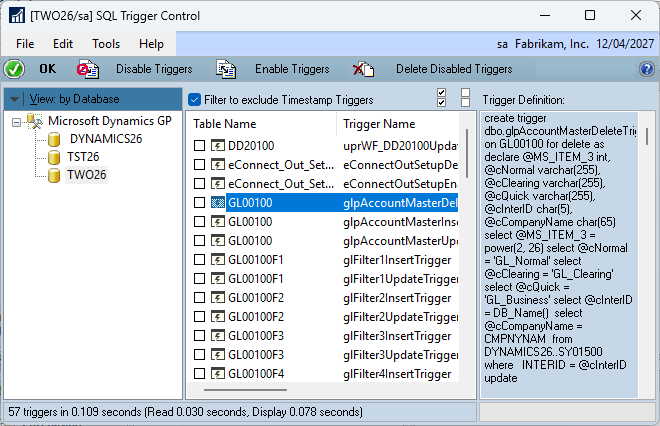
What we are looking for is SQL triggers on the INSERT and UPDATE events for that table.
Note: The triggers in the screenshots are all standard triggers and should not be the cause of any issues.
When SQL Triggers fire, they are executed as a “transaction” along with the original insert or update statement. If any of the triggers fired fail, SQL Server will roll back the changes made by all the triggers as well as the original save (insert or update) event. This is what causes the Error (45) to be generated within the application.
To temporarily fix the error, you will need to disable the trigger which is causing the issue until the problem with the trigger script has been resolved. This can be achieved using the SQL Trigger Control window or right clicking on the trigger in SQL Server Management Studio.

Once the problem trigger is identified, its code can be reviewed and fixed. When the code has been fixed, the trigger can be re-enabled.
The root cause for both of these customers was the creation of development or upgrade testing systems from their live systems, where external (non-GP) databases were not present or had different names. The triggers therefore failed when trying to access the missing databases and caused the roll back of the save table event.
Hope this is helpful information.
David
This article was originally posted on https://www.winthropdc.com/blog.