
#VSIT Visual Studio Integration Toolkit build 18.1 released

 Winthrop Development Consultants is pleased to announce Build 18 of Visual Studio Integration Toolkit (VSIT) for Microsoft Dynamics GP was released on 21-Aug-2023.
This build includes an entire new Custom Forms module along with a number of enhancements as well as improvements to the registration and installer systems. The User Guide Manual has now grown to 90 pages, plus their code examples and sample project also provided.
IMPORTANT NOTICE: With the release of build 18 and with the aim of removing all builds with the security vulnerability, support for build 16 will be discontinued at the end of 2023. Support for build 15 and earlier has already been discontinued. The final released build for each version of Microsoft Dynamics GP will not be discontinued. Sites running discontinued builds need to update before their subscriptions can be renewed. It is recommended that ALL sites update to the latest build to take advantage of the new features, enhancements and fixes.
Build 18 of Visual Studio Integration Toolkit is available for the following Microsoft Dynamics GP versions:
- Microsoft Dynamics GP 2018 and GP 2018 R2 (v18.0)
- Microsoft Dynamics GP Modern Lifecycle (v18.2)
- Microsoft Dynamics GP Modern Lifecycle (v18.3)
- Microsoft Dynamics GP Modern Lifecycle (v18.4)
- Microsoft Dynamics GP Modern Lifecycle (v18.5)
Installer Critical Update
Critical Update: The InstallAware software used to create the installers for our products has been updated to resolve a recently identified critical DLL preloading vulnerability. As a copy of the installer remains on the machine for maintenance, update, removal, and repair tasks, the risk is ongoing until the system is updated with the fixed installer (build 17 or later).
The Installer has been updated to allow Microsoft Dynamics GP to be launched upon completion, if desired.
System Enhancements
The Registration system now includes an Email Distribution List which can be used to include additional email addresses to be cc’d on communications.
The Registration System has also been updated to ensure that old keys remain in the system if no new keys are available. This will keep the 30 day grace period running until it expires, at which time the software will cease to function.
When installing, the system will perform an update check to make sure that you are installing the latest code available for your version of Microsoft Dynamics GP.
Custom Forms Module
Build 18 adds the Custom Forms module which allows Developers to create new Dexterity based custom forms. The custom forms are web client compatible and include all standard GP functionality. You can use these custom forms from Visual Studio Tools, Dexterity or GP Power Tools.
Form types available include:
- Blank Forms
- Dialog Forms (with 1, 2 or 3 buttons)
- Setup Forms (with table)
- Maintenance Forms (with table, matching Lookup, Inquiry form and report)
- Maintenance Forms with Lines (with tables, matching Lookup, Inquiry form and report)
Note: Whilst there are user interfaces for the setting up and testing of custom forms, all of the functionality is available via the API calls and so can be set up automatically by the developer.
Custom Forms are set up by defining the Developer ID to be used for all your forms.
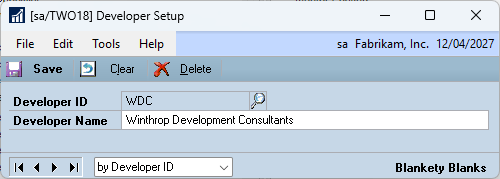
Then setting up the custom form with the terminology for the current systems language IDs.

You can then test the form with the Testing UI which calls the API commands with the selected settings.

Below are examples of the base (un-modified) forms for the Maintenance Form with Lines custom form type.
Maintenance Form

Lookup Form

Inquiry Form

There is also a report linked to the Maintenance and Inquiry forms. The forms and the report can be edited with the Modifier and Report Writer to add whatever custom fields are desired. These fields can be stored in the DUOS (Dynamic User Object Store SY90000) table or in a custom SQL table as desired.
The Visual Studio Integration Toolkit – Custom Forms module is an advanced feature and requires registration for a small annual subscription. More details are on the Product page and the Portal page.
Updates to Helper Functions
Added ExecuteModified, ExecuteModifiedEx and ExecuteModifiedEx? series of Helper Functions to allow sanscript to be executed against Modified Forms.
Other Enhancements
For a detailed change log, look at the VSTMenus.txt file which is also installed with Visual Studio Integration Toolkit into the Microsoft Dynamics GP application folder. To see the updated documentation, look at the user guide which is also installed with the product.
More Information
For more information see the following pages and articles:
- #VSIT Custom Forms Module added to Visual Studio Integration Toolkit Build 18
- Important: Please update all Winthrop Products to resolve an Installer Security Vulnerability
- Visual Studio Integration Toolkit Downloads
- Visual Studio Integration Toolkit Portal
- #VSIT: Updating Visual Studio Integration Toolkit
- #GPPT #BPST #VSIT Solution to Registration issues on Winthrop Development Consultants products
- #VSIT Visual Studio Integration Toolkit Helper Functions
The following articles and links have been updated to include the changes for Build 18:
- #VSIT: Installing/Updating Visual Studio Integration Toolkit
- Discontinued Builds for Winthrop Products
- #GPPT #BPST #VSIT Solution to Registration issues on Winthrop Development Consultants products
- Visual Studio Integration Toolkit Portal
Please update all workstations and servers where Visual Studio Integration Toolkit is installed to this latest build as soon as possible.
Please post comments and feedback. Thank you for your support.
Enjoy
David
25-Aug-2023: Updated with link to article about Discontinued Builds.
This article was originally posted on https://www.winthropdc.com/blog.
0 Comments on “#VSIT Visual Studio Integration Toolkit build 18.1 released”