
#GPPT GP Power Tools build 31.1 released

 Winthrop Development Consultants is extremely excited to announce that Build 31 of GP Power Tools (GPPT) for Microsoft Dynamics GP was released on 16-Aug-2024.
This feature packed build includes an entirely new Form Control module offering “No Code/Low Code” customization functionality to Microsoft Dynamics GP, as well as adding Virtual Fields to the Developer Tools module, and a Database Space Recovery tool to the Database Tools modules. The build also includes many enhancements and improvements across the entire product.
This article lists the major new features and enhancements. It won’t list everything but to give you an idea of how much has been added, the user guide manual has grown from 744 pages in build 30 to 833 pages in build 31.
Highlights of build 31 include:
- Form Control Module for “No Code/Low Code” customization of GP with over 50 rules that can be applied to any form, window or field in any product dictionary.
- Virtual Fields to allow additional fields to be added programmatically to any window in any product dictionary without needing to use Modified or Alternate windows.
- Database Space Recovery tool to recover unused space from heap tables in the system and company databases and also enable or disable compression (if supported by SQL Server).
- Adding of visual cues for per user settings so you can see if per user settings exist without opening the User Settings window.
- Adding of multiple selection on all windows with Mark All and Mark None buttons to allow the selected items to be marked or unmarked.
- Adding multiple selection to Resource Explorer windows to allow multiple resources to be returned to the script editors in Developer Tools.
Build 31.1 of GP Power Tools is available for the following Microsoft Dynamics GP versions:
- Microsoft Dynamics GP Modern Lifecycle (v18.2)
- Microsoft Dynamics GP Modern Lifecycle (v18.3)
- Microsoft Dynamics GP Modern Lifecycle (v18.4)
- Microsoft Dynamics GP Modern Lifecycle (v18.5)
- Microsoft Dynamics GP Modern Lifecycle (v18.6)
- Microsoft Dynamics GP Modern Lifecycle (v18.7) once released
Here is a more detailed list of the changes:
System Features Module
The standard Test Company (<TEST>) and Historical Company (<HISTORICAL>) dialogs on login have been extended to add a More Info button which displays database restore data and General Ledger transaction date ranges.

Also fixed the GP issue to allow the dialogs to work regardless of where <TEST> and <HISTORICAL> appears in the company name (does not need to be at the end) and resolved the multilingual issues when using other languages. For example: <HISTORICAL> vs <HISTORIQUE>.
Administrator Tools Module
Updated all windows where there are User Settings to show a visual cue when User Settings exists. This will identify when there are active User Settings without having to open the window to check. This change has been made throughout the entire product wherever User Settings are used.

Added an option to disable the SQL Server Version check on login. This check makes sure your SQL Server version matches the System Requirements for your version of Microsoft Dynamics GP.
Added an option to suppress the Next Note Index warning for Test and Historical companies.

Restoring a live company database into a test company database without updating the Next Note Index in the Company Master table in the system database, will create the condition that shows the warning. The new option will suppress the warning but does not fix any issues with Note Indexes.
Note: Even if you don’t get the warning on a live company, it does not mean your Note Indexes are without issues. You need to run the Database Tools module: Note Fix Utility to check properly.
Added a refresh button and a dictionary field lookup button to Resource Information.

Added Dictionary Field Explorer window to the Resource Explorer to be able to select dictionary fields rather than fields specifically used in a window on a form or in a table. The Field Explorer has also been added to the Names buttons in the Developer Tools script editor windows.

Throughout the entire product, everywhere there are Mark All and Mark None buttons used in conjunction with a Listview, you can now use the Control and Shift keys to multiselect items and the Mark All and Mark None takes effect on the selection instead of all items. If there is no selection or a single selection, Mark All and Mark None change all items.

Developer Tools Module
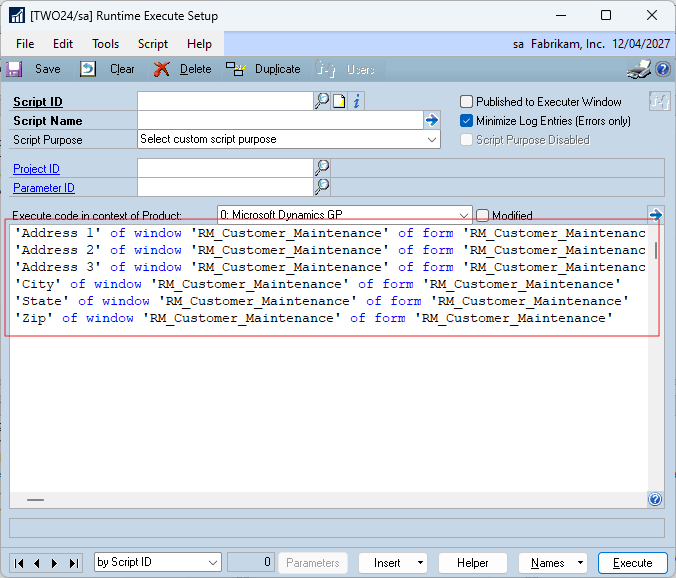
When using the Form Explorer window and Table Explorer window of the Resource Explorer from the Names button on all the script editor windows in Developer Tools, you can now multiselect items on the right-hand pane and return multiple items at a time to your script.

The multiselected fields are returned as multiple lines to your script.
Added User Settings Visual Cues to all the Developer Tools windows. The Project Setup window also shows the visual cue (red dot) on the icon of individual items that make up the project.

Added prompt buttons to each language and a Test button to the Messages Setup window.

Clicking the Test button will show what the messages look like on a dialog.

Virtual Fields for Developer Tools module
Build 31 adds Virtual Fields to the Developer Tools module. Virtual Fields are fields that can be added to windows programmatically without needing Modified or Alternate windows. Virtual Fields use a series of Helper Functions to expand a window, define the fields and be able to address them.

The screenshot above contains 12 virtual fields to add the buttons, prompts, fields, visual switch and even the extra horizontal line.
Virtual Fields can be used to add any dictionary field from any dictionary to a window.
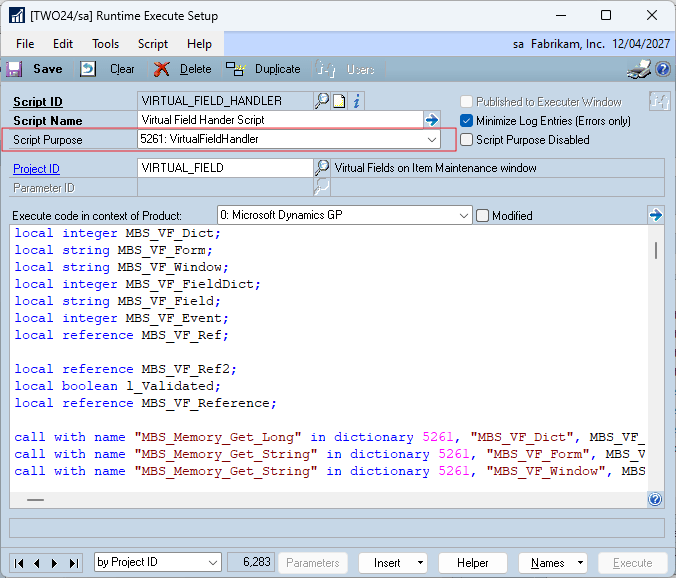
You can also add triggers to Virtual Fields added to windows in the core Dynamcis.dic product dictionary. The code to handle the triggers is added using a Runtime Execute Setup script with the 5261: VirtualFieldHandler Script Purpose.
Form Control Module
Build 31 adds the entirely new Form Control module which provides “No Code/Low Code” customization to Microsoft Dynamics GP. Form Control has almost 60 Rule Types and uses resource Filters to select the Forms, Windows and Fields for rules to be applied to.
The Rule Types can be divided into 3 types: Field Level Security Rules, Form Control Rules and Developer Tools Rules.
- Field Level Security Rules can replace all the functionality offered by Field Level Security with a more powerful and flexible configuration across multiple resources with a single rule. It also supports the Security Task and Security Role security model and will work in places where Field Level Security fails.
- Form Control Rules perform many simple customizations without any coding but can be extended with Form Control Conditional Scripts if desired.
- Developer Tools Rules allow triggers to be applied to multiple form, window or field resources without having to create separate Trigger IDs for each resource.

Password can be applied to rules as desired. The Password Setup window provides multilingual support and options for how to apply the password.

Every Rule can have a Form Control Conditional Script added using a Script ID created in the Runtime Execute Setup window with the 5261: FormControlConditonal Script Purpose.

Below is the Customer Maintenance window with a few different example rules applied. We have made the window read only so users have the option to drill back to the window to view the customer’s details but cannot make changes. We have hidden buttons that we don’t want the user to open.
We have also added rules to rename the window title and customer field prompts from Customer to Client.

The above window also shows how a single Form Control ID can be used with Virtual Fields to add a Customer Status indicator to all windows in Microsoft Dynamics GP where there is a Customer Number field displayed.
The Form Control is a new module that requires separate registration and adding scripts to Form Control rules requires the Developer Tools module to also be registered.
Database Tools Module
SQL Login Maintenance has been updated to allow multiple users to have their password reset with password reset emails sent for all email modes. It will also display a progress dialog when sending emails so you can see how many emails are left to send.
The Note Fix Utility has had additional enhancements to better handle recurring transactions for the GL, PM, RM and IV modules.
A new Database Space Recovery Tool has been added to reclaim unused space from Heap Tables in the Microsoft Dynamics GP databases.

On SQL Server Enterprise and Azure systems which support compression, the Database Space Recovery tool can also be used to apply or unapply Page Compression to Heap Tables and Clustered Tables. Adding compression can improve overall performance* and recover up to 50% of the space previously taken for the database.
* Using SQL Server Compression does increase CPU load but reduces time for drive reads and writes. Unless the server is already CPU bound, the end result is better overall performance.
Other Enhancements
For a detailed change log, look at the GPPTools.txt file which is also installed with GP Power Tools in the Microsoft Dynamics GP application folder.
More Information
For more information refer to the following pages and articles:
- Important: Please update all Winthrop Products to resolve an Installer Security Vulnerability
- GP Power Tools Downloads (see Benefits Presentation)
- GP Power Tools Portal (see Demonstration Videos)
- #GPPT Updating GP Power Tools
- #GPPT #BPST #VSIT Solution to Registration issues on Winthrop Development Consultants products
The following articles and links have been updated to include the changes for Build 31:
- #GPPT FAQ: What features belong to each GP Power Tools Module?
- #GPPT GP Power Tools: What’s in each module series?
- #GPPT Installing/Updating GP Power Tools
- #GPPT Setting up GP Power Tools
- #GPPT #BPST #VSIT Solution to Registration issues on Winthrop Development Consultants products
- #GPPT Where can I find GP Power Tools Documentation
- GP Power Tools Portal
- GP Power Tools Feedback Survey
Thanks to all the customer sites who were willing to install build 31 beta code into their live environments and to my amazing team of beta testers especially Arthur Achilleos, Beat Bucher, Geoff Harding and Brynne Poole for their input in making another fantastic build. Thank you.
Also, thanks to Rob Farley MVP from LobsterPot Solutions, whose extensive SQL Server knowledge helped with performance improvements to the Form Control module. If you have performance or other issues with SQL Server, I can highly recommend contacting Rob.
Please update all workstations and servers where GP is installed to this latest build as soon as possible.
Please post comments and feedback. Thank you for your support.
Enjoy
David
This article was originally posted on https://www.winthropdc.com/blog.
0 Comments on “#GPPT GP Power Tools build 31.1 released”