
#GPPT GP Power Tools build 32.1 released

 Winthrop Development Consultants is extremely excited to announce that Build 32 of GP Power Tools (GPPT) for Microsoft Dynamics GP was released on 20-Jun-2025, with a minor fix released 22-Jun-2025*.
This amazing build includes new features for every module in GP Power Tools. The build also includes many enhancements and improvements to existing functionality across the entire product.
This article lists the major new features and enhancements. It won’t list everything but to give you an idea of how much has been added, the user guide manual has grown from 833 pages in build 31 to 882 pages in build 32.
IMPORTANT NOTICE: After the release of build 32, support for build 29 will be discontinued at the start of August 2025. Support for build 28 and earlier has already been discontinued. The final released build for each version of Microsoft Dynamics GP will not be discontinued. Sites running discontinued builds need to update before their subscriptions can be renewed. It is recommended that ALL sites update to the latest build to take advantage of the new features, enhancements and fixes.
Highlights of build 32 include:
- Workstation Access: Automatically Log into Dynamics GP or GP Utilities for specified workstations instance. Designed to be used with automation of processes.
- GitHub Support: Automatically export projects into a GitHub Repository for cloud backups.
- Custom Tables & Table Buffers: Create and maintain custom SQL tables across multiple databases, with the option to use the table using “Dexterity style” table buffer commands.
- Parameter Inspector: View values for Parameter Lists, Memory Parameters, Table Parameters and Custom Table Buffers.
- Form Control: Improved performance using shared cache records for core resources.
- Database Space Recovery: Support for SQL Compression on more versions of SQL Server and support for Row Compression as well as Page Compression.
- GenView SQL View Generator: Creates SQL Views for Dynamics GP tables using full “user friendly” technical names for tables and columns (fields).
- Auto Procedure Optimizer: Updates zDP Auto Stored Procedures with a fix that will prevent unexplained performance issues with queries running 10 to 20 times slower.
Build 32.1 of GP Power Tools is available for the following Microsoft Dynamics GP versions:
- Microsoft Dynamics GP Modern Lifecycle (v18.2)
- Microsoft Dynamics GP Modern Lifecycle (v18.3)
- Microsoft Dynamics GP Modern Lifecycle (v18.4)
- Microsoft Dynamics GP Modern Lifecycle (v18.5)
- Microsoft Dynamics GP Modern Lifecycle (v18.6)
- Microsoft Dynamics GP Modern Lifecycle (v18.7)
Here is a more detailed list of the changes:
System Features Module
Changes to the System Features Module of GP Power Tools include the following:
Improvements to the table update conversion scripts used to update the structure of tables while maintaining the data stored in the table. This functionality is used by the GP Power Tools installer as well as the Developer Tools for Custom Tables and Database Tools for Database Validation.
Fixed an issue in core Dynamics GP where using the old style RM Statement email feature could product an email with an attachment using the .docx extension when the file is actually a .pdf file.
Administrator Tools Module
Changes to the Administrator Tools Module of GP Power Tools include the following:
Added Workstation Access window to enable Remember User and Remember Company settings for the current workstation instance only. This feature can be used for both Microsoft Dynamics GP and GP Utilities to log in automatically and then start an automated process as desired. The user credentials are securely stored in the registry with multiple layers of encryption.

Added a number of Dex.ini setting options to work with Workstation Access, so it can be controlled from the Dex.ini if required. There is also an example macro for use with the GP Utilities.
* Fix released on 22-Jun-2025 to resolve an issue with Dynamics GP Utilities when Validating Product Version Information. GP Power Tools can now remain in the DynUtils.set launch file to allow Workstation Access to work for Dynamics Utilities without causing issues when installing or updating using Dynamics GP Utilities.
Added Dex.ini Setting MBS_Debug_DisableSUPERUSER to allow disabling of the automatic creation and updating of the SUPERUSER Security Role and Security Task.
Updated the Activity Cleanup code with fixes for triggers that have not been written to handle set based updates to the Activity table. The triggers fixed are syVendorAnalysisDeleteTrigger, tcsSYSTR00006_ACTIVITY_DEL and mfg_delete_orphaned_MO_locks triggers
In Product Version Validation, there is now the ability to exempt product dictionaries from the missing product checks as used by some of the Database Tools module features.

Added fix for Instance path case sensitivity on Binary Sort Order SQL Servers to Product Version Validation.
Added Windows User Name to the Security Log Tracking tables and added the field to associated windows and reports.
Developer Tools Module
Changes to the Developer Tools Module of GP Power Tools include the following:
Added Parameter Inspector window to allow viewing of Parameter List, Table Parameter and Memory Parameter values. The Parameter Inspector is available from the script or options menus of most Developer Tools windows in GP Power Tools.

The Parameter Inspector window can also be used to view the contents of Custom Table Buffers.
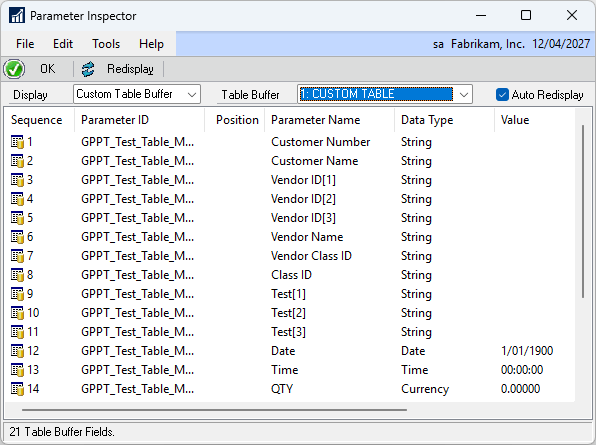
A new Custom Tables Setup window has been created to allow for developers to create and maintain custom SQL tables for storing additional data. The fields can use any field defined in any product dictionary or be completely new fields. The table definition includes indexes and the fields within those indexes.

Custom Tables can be set to automatically create if the table is missing. They will also automatically update if the definition is changed.
Custom Tables can be enabled for use with Custom Table Buffers, which allows the table to be used from scripts in the same manner as “Dexterity table buffers” via a set of Helper Function commands:
- MBS_Buffer_Open and MBS_Buffer_Close to open and close a Table Buffer for a Custom Table.
- MBS_Buffer_Table_Clear and MBS_Buffer_Table_Fill to clear and fill all fields in a Table Buffer for a Custom Table.
- MBS_Buffer_Field_Clear and MBS_Buffer_Field_Fill to clear and fill a specific field in a Table Buffer for a Custom Table.
- MBS_Buffer_Field_Get and MBS_Buffer_Field_Set to read and write data for a specific field in a Table Buffer for a Custom Table.
- MBS_Buffer_Table_Get to read or read for change, using query by example, a SQL record into a Table Buffer for a Custom Table.
- MBS_Buffer_Table_Save to save the current buffer with Insert or conditional Update for changed fields for a Table Buffer for a Custom Table.
- MBS_Buffer_Table_Remove to remove a single locked record from a Table Buffer for a Custom Table.
- MBS_Buffer_Table_Release to release a passive lock applied to a Table Buffer for a Custom Table.
- MBS_Buffer_Range_Clear to clear any Indexed or Where ranges assigned to a Table Buffer for a Custom Table.
- MBS_Buffer_Range_Start and MBS_Buffer_Range_End to set Start and End values for an Indexed Range assigned to a Table Buffer for a Custom Table.
- MBS_Buffer_Range_Where to define or clear a Where range assigned to a Table Buffer for a Custom Table.
- MBS_Buffer_Range_Remove to remove a range of records or all records if no range specified from a Table Buffer for a Custom Table.
- MBS_Buffer_Range_Where_Get to read a Where range assigned to a Table Buffer for a Custom Table.
- MBS_Buffer_Table_Error to return the last table error status value from a Table Buffer for a Custom Table.
Added Find Next Button with auto clear of Find text to SQL Execute Setup, SQL Executer, and both SQL Results windows for faster searching of results.
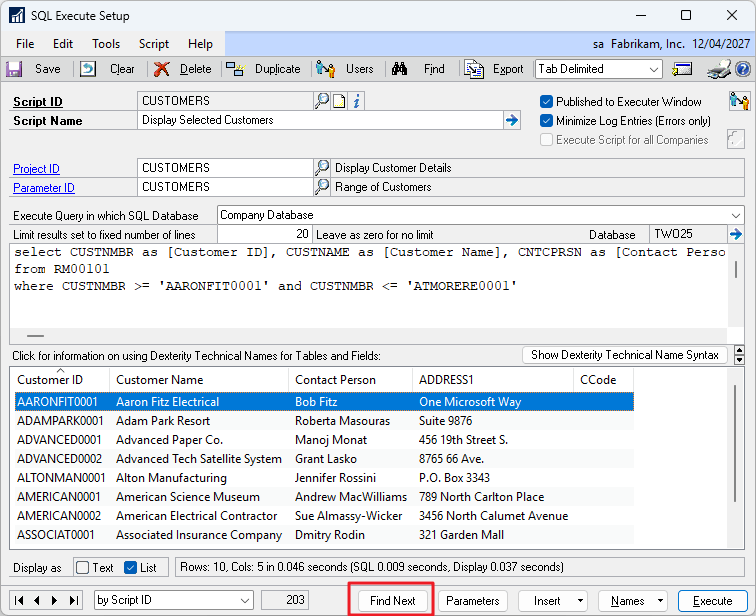
Updated Project Setup window to add support for GitHub integration when exporting projects to keep “cloud” backup copies of projects with version history.

Added improvements to how Project Setup starts triggers, with the option to decide whether manual triggers in the project should be started or just the ones marked as automatic start.
Form Control Module
Changes to the Form Control Tools Module of GP Power Tools include the following:
Updated Form Control Module’s Resources Cache Table to use System level records (no user or company) for form resources in the core Dynamics.dic dictionary, thus saving space and improving performance.
Added Form Control Cache Setup window to Form Control Setup window to allow Shared Cache mode to be controlled by the administrator.

Added Form Control Excluded Forms window to allow forms to be permanently excluded from Form Control, if required.

Form Control Intelligent cleanup of Modified Resources to only remove records older than the last modified date of the custom forms dictionary file.
Database Tools Module
Changes to the Database Tools Module of GP Power Tools include the following:
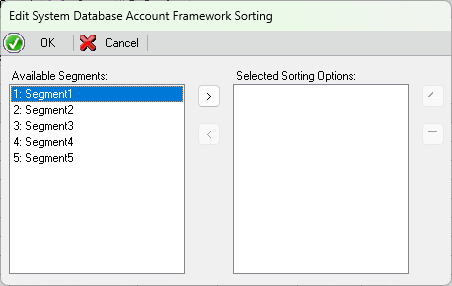
Updated Database Validation Edit Account Framework window to add ability to see and edit the Account Segment Sorting Options.
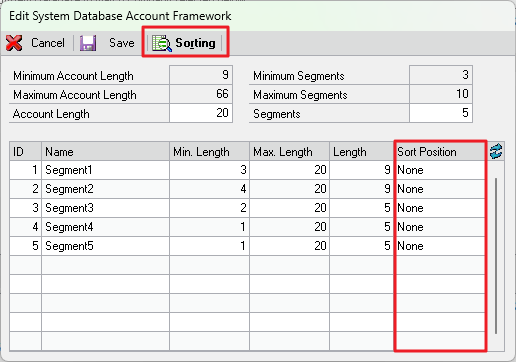
The Sorting Options window allows additional segments to be included as indexes.
Fixed Note Fix Utility incorrect Field name for default table settings for the IV_TRX_HIST table where it refers to Document Number in IV_TRX_HDR_WORK rather than IV Document Number.
Updated Database Space Recovery to enable SQL Server Compression functionality for all versions after SQL Server 2016 (SP1) or later. Updated Database Space Recovery Tool to offer both Page and Row Compression as well as make recommendations based on file types and Scan and Update Statistics. Database Space Recovery also removes space allocated to deleted records in Heap tables.

Added MBS_Debug_DisableSQLCompression Dex.ini Setting to disable SQL Compression, if it fails to work for expected versions of SQL.
Updated SQL Login Maintenance window to add User Email Address as defined in the User Additional Information window so you can see where password reset emails will be sent.
Added GenView SQL View Generator window to create SQL Views of Microsoft Dynamics GP tables using descriptive Dexterity Technical Names. The Views created use rtrim() on string fields to remove the padded spaces due to the use of CHAR rather than VARCHAR as the data type.

Updated GenView SQL View Generator to format date fields to only show the date component with a choice of 6 standard formats defaulting to the current regional settings. Updated GenView SQL View Generator to format time fields to only show the time component in standard 24 hour time format.
Added Auto Procedure Optimizer window to update zDP_ Auto Stored Procedures to use SELECT TOP (@T) as using a variable can ensure better performance without random performance loss of up to 10 to 20 times slower.

The article below explains the issue with the SELECT TOP command and how the fix resolves the issue:
Other Enhancements
For a detailed change log, look at the GPPTools.txt file which is also installed with GP Power Tools in the Microsoft Dynamics GP application folder.
More Information
For more information refer to the following pages and articles:
- Important: Please update all Winthrop Products to resolve an Installer Security Vulnerability
- GP Power Tools Downloads (see Benefits Presentation)
- GP Power Tools Portal (see Demonstration Videos)
- #GPPT Installing/Updating GP Power Tools
- #GPPT #BPST #VSIT Solution to Registration issues on Winthrop Development Consultants products
The following articles and links have been updated to include the changes for Build 32:
- #GPPT FAQ: What features belong to each GP Power Tools Module?
- #GPPT GP Power Tools: What’s in each module series?
- #GPPT Installing/Updating GP Power Tools
- #GPPT Setting up GP Power Tools
- #GPPT #BPST #VSIT Solution to Registration issues on Winthrop Development Consultants products
- #GPPT Where can I find GP Power Tools Documentation
- GP Power Tools Portal
- GP Power Tools Feedback Survey
Thanks to all the customer sites who were willing to install build 32 beta code into their live environments and to my amazing beta testers especially Arthur Achilleos for their input in making another amazing build. Thank you.
Please update all workstations and servers where GP is installed to this latest build as soon as possible.
Please post comments and feedback. Thank you for your support.
Enjoy
David
22-Jun-2025: Updated to fix to Dynamics Utilities for GP Power Tools error when Validating Product Version Information.
This article was originally posted on https://www.winthropdc.com/blog.
0 Comments on “#GPPT GP Power Tools build 32.1 released”