
#GPPT Known issue with Avalara Tax when posting Payables Transactions

 We have now seen two cases where GP Power Tools and Avalara Tax have clashed and have caused Microsoft Dynamics GP to crash when posting Payables Transactions when using Avalara’s Tax Calculations.
Many hours of research into this issue by both Winthrop Development Consultants and Avalara have failed to identify the root cause of the instability in GP, however, there is a simple a work around solution.
The following is an excerpt from a support case logged with us:
A customer with GP Power Tools has run into an issue while posting Payables Transaction Entries which is causing GP to crash. It appears that it is related Avalara and their Use Tax calculation because if the customer disables Use Tax for a vendor the transaction posts fine.
Here is what Avalara responded with for a resolution:
Based on the logs and our internal engineering records, this crash is caused by a known interaction between the Avalara GP Connector’s Consumer Use Tax functionality and third-party GP customizations most specifically, GP Power Tools. When the Avalara Use Tax accrual message displays and then reactivates the Payables Transaction Entry window, GP Power Tools intercepts that window activation through its “Window Position Memory” and “Window Position Check” scripts. This collision is what ultimately causes GP to crash.
To resolve this issue immediately, please disable the Window Position Memory and Window Position Check features within GP Power Tools specifically for the Payables Transaction Entry window. Doing this will allow the Avalara code to execute normally and the transaction to post successfully without crashing.
As for a long-term resolution, this workaround is highly effective and will keep their AP process running smoothly. We have confirmed that this specific conflict does not occur on newer versions of GP (such as GP 18.7 or 18.8 [or later]) because of native changes to the underlying GP code on that form. Once the customer upgrades to a newer GP version, the interaction will be permanently resolved.
As described in the response from Avalara, the work around solution is to disable the Window Position Memory and Window Position Check features for the Payables Transaction Entry window. It is actually the Window Position Check feature that is involved in the clash as the code for that feature is executed every time a window is activated (gains focus). This is the code that ensures that windows cannot be opened beyond the visible area of the desktop and so never disappear “off screen”.
FYI: The Window Position Memory feature runs its code when the window is opened (to restore the previously saved position) and when the window is closed (to save the current position). To ensure a window is not opened “off screen” when remembering its position, the Window Position Check must be enabled before the Window Position Memory can be enabled.
Below are the steps to exclude the window from the Window Position Check feature, which will also exclude the window from the Window Position Memory feature:
- Go to the GP Power Tools Area page
- Select Setup >> Window Position Memory
- Locate the Payables Transaction Entry window
- Under root level of tree (if Window Position Memory for the window is already enabled)
- Or Under Microsoft Dynamics GP >> Purchasing
- Click on Checkbox to change to X to disable. Say Yes to any dialogs.
- Click OK to save.
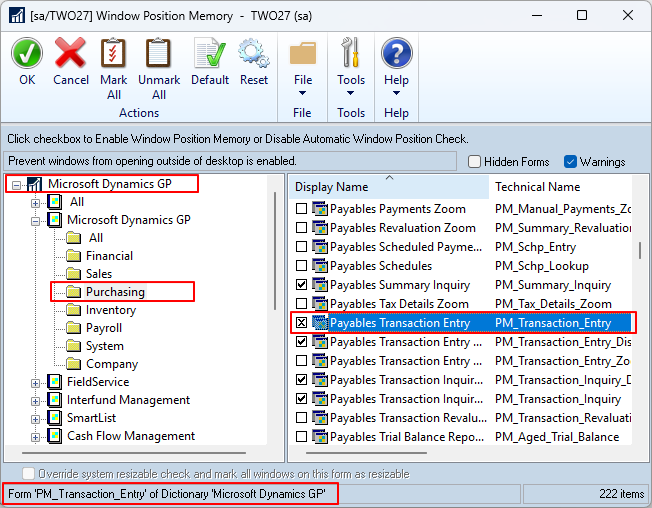
The window status at the bottom will show “Form ‘PM_Transaction_Entry’ of Dictionary ‘Microsoft Dynamics GP’ ” when the Payables Transaction Entry window is selected. The checkbox can have three states with the following meanings:
- Empty: Window Position Check is enabled, Window Position Memory is not enabled.
- Checked: Window Position Check is enabled, Window Position Memory is enabled.
- Crossed: Window Position Check is disabled, Window Position Memory is disabled.
This work around solution can be removed and the window returned to Checked status to restore the functionality once GP has been upgraded to version 18.7 or later. No changes have been made to the Window Position Check code in GP Power Tools since June 2017, and no changes have been made even now that the issue is resolved.
Hope this information is helpful.
David
This article was originally posted on https://www.winthropdc.com/blog.