
Any Font in the Dexterity Script Editor

 This is a reposting of an article Patrick Roth originally wrote on my Developing for Dynamics GP blog.
Aren’t secrets fun? And while having a secret is fun in and of itself, it is also fun to share them from time to time (and allowed to share them).
The secret today is an undocumented feature that I believe was added to 10.0 SP2. As an undocumented feature, this means:
- It might not work for you
- It might cause “issues”
- Don’t ask support about it if it causes “issues”
- Might not work in the future
That said:
- I can’t see why it wouldn’t work
- I don’t see what issues it would cause and is completely reversible
ScriptEditorFontStyle=Bold,Italic,Underline
I’m pretty sure that this is NOT the combination I’d pick to work with but you can clearly see in the screenshot that it does work.
Screenshot of my Dexterity Script Editor window using the above settings
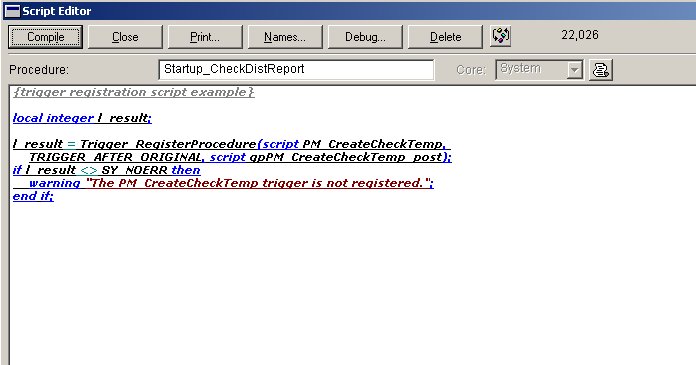
One important thing to note. While the Script Editor window will respect the settings for the ScriptEditorFontName and use that font, the Dexterity Options window DOES NOT know about the change. If it finds a font in the Dex.ini it doesn’t know about, it will switch your Dex.ini to use the default Courier font. So if you need to go into the Options window you’ll probably have to change your Dex.ini again to reflect the font you’d like to use. This is the price of using this particular undocumented feature.
Patrick
This article was originally posted on the Developing for Dynamics GP Blog and has been reposted on https://www.winthropdc.com/blog.
That’s cool. I can now use my fav. font Tahoma.
I also feel like we don’t normally use Options window more often, unless we change our Source Code Control frequently (which is very important settings in the Options panel) and probably some other options.
Certainly a cool feature.
Vaidy
Hi Vaidy
I use a separate Dex.ini file for each of my development projects and pass that as a parameter along with the development dictionary in the shortcut icon I use to launch Dexterity for that project.
This is discussed in the Knowledge Base article I wrote:
How to set up the development environment when you use Dexterity in Microsoft Dynamics GP (KB 949622)
https://mbs.microsoft.com/knowledgebase/KBDisplay.aspx?scid=kb;en-us;949622
David