
#GPPT GP Power Tools Training at Community Summit 2026 in Nashville, TN, USA

 Want to learn how to get the most out of GP Power Tools? Discover all the benefits of each module and how you can employ them in your systems? GP Power Tools is the ultimate suite of tools to get the most out of your Microsoft Dynamics GP system, regardless if you are a user, a system admin, a consultant, a developer or a database administrator.
I am pleased to announce that as well as the Dexterity Training (during the week before the conference), there will also be GP Power Tools training offered at Academy at Summit in the days before Community Summit in Nashville, Tennessee, USA.
There is always lots of new functionality and enhancements to cover with the release the latest builds of GP Power Tools. It has features that will benefit all users of GP regardless of the level of the technical experience.
Thank you to all those who completed the survey about training for this year’s Summit Conference.
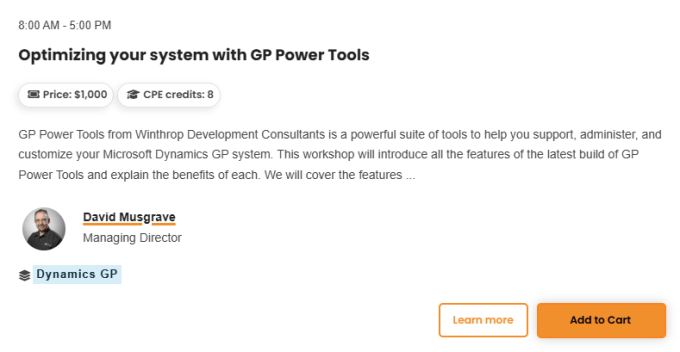
The training will be presented as a single full day course on Sunday 11th October 2026, running from 8:00am to 5:00pm with lunch included.
To get an understanding of what GP Power Tools can do for you and how it can solve your pain points, check out the Benefits Presentation or watch the video below:
GP Power Tools Introduction (direct link)
To get a more in depth look at GP Power Tools, including what’s new in the latest build, whether you are an existing user or not, come to this workshop day.
In the morning, we will be covering the Installation, System Features and the Administrator Tools and Database Tools modules. Then in the afternoon we will be covering the new Form Control Tools and Developer Tools modules.
Leveraging GP Power Tools
GP Power Tools from Winthrop Development Consultants is a powerful suite of tools to help you support, administer and customize your Microsoft Dynamics GP system.
This workshop will introduce all the features of the latest builds of GP Power Tools and explain the benefits of each. We will cover the features of all four of the modules so that you have a full understanding of what the tool is capable of and how it can solve your pain points. The modules of GP Power Tools are:
- System Features module
- Administrator Tools module
- Developer Tools module
- Form Control Tools module
- Database Tools module
We will cover topics including identifying resources (windows, tables, fields, etc.), resolving application security issues, setting up deny based security, capturing screenshots and logs, troubleshooting the cause of an issue, controlling Dex.ini settings and even avoiding issues by color coding companies.
We will also cover the scripting and programming capabilities of the tools, showing how it can be used to customize the system and fix issues.
We will experiment with the new Form Control module and see how to create “no code/low code” customizations in Microsoft Dynamics GP.
Also, we will explore the Database Validation, Note Fix Utility and Database Space Recovery features to understand how this will help ensure your system is in “tip top” shape and so avoid upgrade issues.
David Musgrave, the developer, will guide you through the installation process and use of the tools. You will learn what the recommended configuration is and how to set up the tools to get the most out of it.
Learning Objectives:
- Installing GP Power Tools.
- Setting up GP Power Tools to get the most out of it.
- Identifying dictionary resources and security objects.
- Capturing Screenshots and logs from the system.
- Reviewing and changing security access.
- Using Deny Based Security to control security and hide menus.
- Troubleshooting issues with customizations.
- Centrally controlling Dex.ini settings.
- Usability features such as Company Color Themes and Window Position Memory.
- How to use Database Validation to fix potential upgrade problems before they occur.
- How to export and import data as XML files.
- How to use Advanced Trigger Mode to track down issues.
- How to use triggers to create customizations.
- How to write scripts in a variety of scripting languages.
- How to create user interfaces to your scripts with parameter lists.
- How to create custom report writer functions to retrieve data from any source.
- How to create “no code/low code” customizations across multiple windows in GP.
The above agenda is a guideline and might be re-organized to fit additional topics if time allows.
Who should attend?
Customers or Partners interested in understanding what GP Power Tools can do for them and how to get the most out of the product. Anyone interested in replacing VBA with GP Power Tools should also attend the Dexterity Training (see below).
Prerequisites:
- Understanding of navigation and administration of Microsoft Dynamics GP.
- Understanding of development concepts is helpful but not required.
Computer Prerequisites:
- Attendees will need a laptop with SQL Server and Microsoft Dynamics GP (preferably latest version) locally installed and running on it. Only sample company is needed.
- Attendees must know the laptop’s administrator password, SQL Server ‘sa’ password and GP system password (if one is setup). As they will need to change settings and install software.
The cost will be US$1,000 per attendee for the day. Lunch will be provided.
Location
The training room (Volunteer Mezzanine 2, Level M) will be at the Gaylord Opryland Convention Center.
Training Registration
To register please click on the link below to look at the Academy Schedule, filter by Dynamics GP and select the Oct 11 tab to find the session
Conference Registration Discount

If you are staying for Community Summit, you can use this special Winthrop Development Consultants 15% discount code (WinthropDev15) when registering. Make sure you come visit us at Booth 321 during the Expo hours.
Dexterity Training
If you want to be able to develop using GP Power Tools – Developer Tools module (especially if replacing VBA), knowledge of Dexterity will be invaluable. Why not attend the Dexterity training in the week before the conference:
Hope to see you there. I know that everyone who has attended these sessions before has learnt plenty and really enjoyed them.
David
15-Jun-2026: Updated with Direct Link to session.
25-Sep-2026: Update Room details.
This article was originally posted on https://www.winthropdc.com/blog.
0 Comments on “#GPPT GP Power Tools Training at Community Summit 2026 in Nashville, TN, USA”