
#GPPT #MSDynGP Making your Dynamics GP system faster and decreasing data space Part 1

 Over time the amount of data stored by your Microsoft Dynamics GP system can get quite large. Without buying new hardware, there is a simple way to make your system faster and decrease the space used to store your databases.
This is where a couple of the features of the Database Module of GP Power Tools come in to help. This is article 1 of 3 in the series.
We need to start with a little theory first to explain the problems and then we can see how GP Power Tools solved them.
The Theory – Heap Tables
There are two types of tables in Microsoft SQL Server:
- Clustered Tables
- Heap Tables
A Clustered Table has a Clustered Index. You can only have one index defined as a Clustered Index on a table. When a Table has a Clustered Index, the data is physically stored in the order of that index. So, when a new record is added, all the following records are moved down to make space and the new record is inserted into the correct location. When a record is deleted, all the following records are moved back up to close the gap where the deleted record was. Clustered tables can be slower to insert and delete records but are faster when retrieving multiple records in the order of the Clustered Index. They also have better storage space management due to the way the gaps from deleted records are closed when the rest of the records are shuffled up.
A Heap Table does not have any indexes marked as Clustered. When records are added, they are always added to the end of the data stored. When a record is deleted, it is marked as deleted and the space for that record is left uncovered. Inserting and deleting records is fast, but there are no speed benefits using a particular index as the data is not stored in any order. Over time the space used for this table can become quite large as the space taken by deleted records remains used at the file system level even if it is not used at the database level.
The Problem – Heap Tables
Great Plains Dynamics was originally written for ISAM databases, Ctree and Btrieve (AKA Pervasive-SQL or P.SQL). When version 3.15 was released with added SQL Server support, none of the tables were marked as Clustered. Over later releases some of the Dexterity table definitions were changed to add a clustered index, so there are now some clustered tables but many of the tables are still heap tables without a clustered index.
For setup and master (cards) tables this is not really much of an issue as records are rarely deleted. However, for transaction tables where there are separate tables for WORK, OPEN and HISTORY, records are constantly being deleted as transactions are posted and later finalized or fully applied and moved to history.
Note: Always keep your history, the options to not save history should never be selected as this can make auditing impossible. In the days when hard drive storage was expensive, deleting history might have been a necessary evil, but that is no longer the case.
Understanding that most of the transaction tables in Dynamics GP are heap tables and that data in those tables is constantly being deleted, explains why the storage space of those tables is often much larger than the data space actually being used.
The Solution – Heap Tables
The solution to this issue is the first of the features in GP Power Tools Database Tools Module, Database Space Recovery. You can expand the window size to see other information.
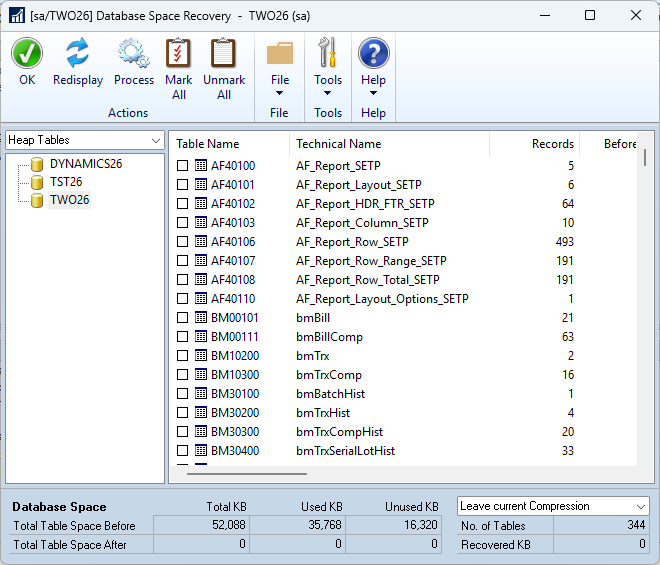
The Database Space Recovery window (in Heap Tables mode) will display heap tables (with records) and allow you to select them for processing. When processed the window will display the space used before and after so you can see how much was recovered.
More Information
For more information see the following articles
- #GPPT #MSDynGP Making your Dynamics GP system faster and decreasing data space Part 1
- #GPPT #MSDynGP Making your Dynamics GP system faster and decreasing data space Part 2
- #GPPT #MSDynGP Making your Dynamics GP system faster and decreasing data space Part 3
- #GPPT GP Power Tools: What’s in the Database Tools module?
- GP Power Tools Portal: https://winthropdc.com/GPPT
Hope you find this information useful.
David
This article was originally posted on https://www.winthropdc.com/blog.
0 Comments on “#GPPT #MSDynGP Making your Dynamics GP system faster and decreasing data space Part 1”